

KCEX Futures Order Types: Limit, Market, Trigger, Trailing, and TP/SL Orders
2026-08-26 18:13:43
KCEX perpetual futures support various order types, including limit orders, market orders, trigger orders, trailing orders, advanced limit orders, and take-profit and stop-loss orders. Each futures order type differs in its execution method, trigger conditions, and applicable scenarios. This article explains the meaning, advantages, disadvantages, use cases, and setup methods of each KCEX futures order type, helping you understand their differences and select the appropriate order type based on your trading needs.
1. Limit Order
(1) Definition
A limit order allows users to specify an order price. The order will be filled at the specified price or at a better price.
When a limit order is submitted, if an order at the specified price or a better price is already available in the order book for matching, the limit order will be filled immediately at the best available price. If no matching order is available at the specified price or a better price, the limit order will remain in the order book awaiting execution, thereby increasing market depth.
(2) Advantages and Disadvantages
Advantages: A limit order allows you to control trading costs precisely because the execution price will not be worse than the specified price. If the order is not filled immediately and remains in the order book as a Maker order, you may also benefit from lower Maker fees.
Disadvantages: If no suitable price is available on the opposite side of the order book, the order may remain unfilled.
(3) Use Cases
Limit orders are generally suitable when users want to buy or sell at a specified price.
The following are two common limit order scenarios:
Scenario 1: The current BTC perpetual futures price is 80,000 USDT. If Trader A wants to buy at 79,000 USDT, they can place a limit buy order at 79,000 USDT. The order will be filled when the price falls to or below 79,000 USDT.
Scenario 2: The current BTC perpetual futures price is 60,000 USDT. If Trader A wants to sell at 61,000 USDT, they can place a limit sell order at 61,000 USDT. The order will be filled when the price rises to or above 61,000 USDT.
(4) How to Set a Limit Order
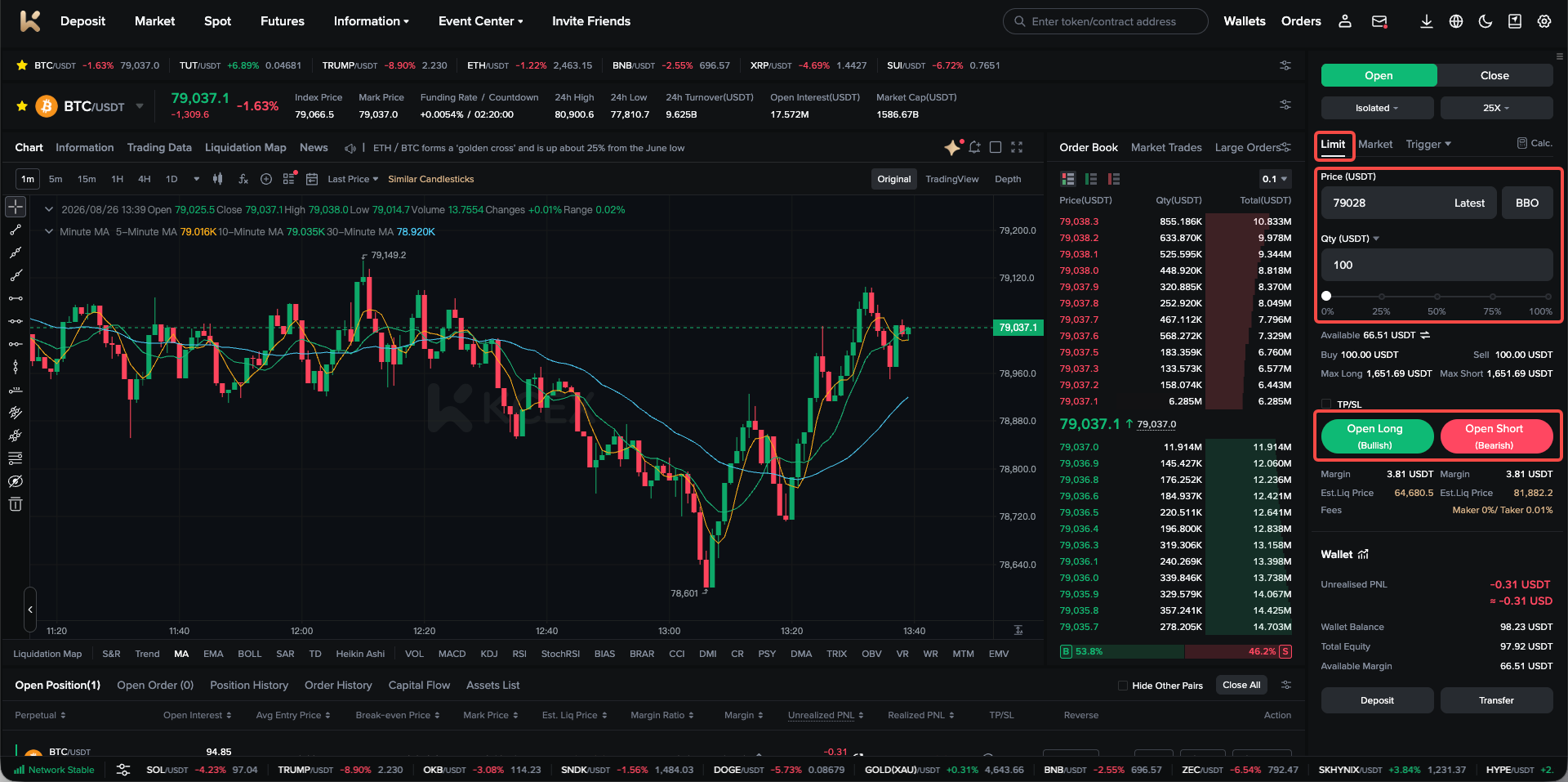
Go to the order placement section of the futures trading page, select Limit Order, enter the price and quantity, and then click Open Long or Open Short to place the order.
2. Market Order
(1) Definition
A market order allows users to buy or sell immediately at the best available market price for rapid execution.
(2) Advantages and Disadvantages
Advantages: Users do not need to specify a price, and the order can be matched and filled as quickly as possible at the best available market price.
Disadvantages: Although a market order enables rapid execution, it does not guarantee the execution price. During significant market volatility, the final execution price may therefore differ from expectations. To protect users from losses caused by excessive slippage, KCEX now supports setting a slippage percentage for market orders. Users can specify an acceptable slippage range before placing a market order.
(3) Use Cases
Market orders are generally suitable when users want to buy or sell quickly at the current market price.
The following are two common market order scenarios:
Scenario 1: The BTC perpetual futures price rapidly breaks above 80,000 USDT. Trader A wants to buy as soon as possible and is willing to accept the market price as long as the BTC perpetual futures order is filled immediately. In this case, Trader A can place a market buy order.
Scenario 2: The BTC perpetual futures price rapidly falls below 79,000 USDT. Trader A wants to sell as soon as possible and is willing to accept the market price as long as the BTC perpetual futures order is filled immediately. In this case, Trader A can place a market sell order.
(4) How to Set a Market Order
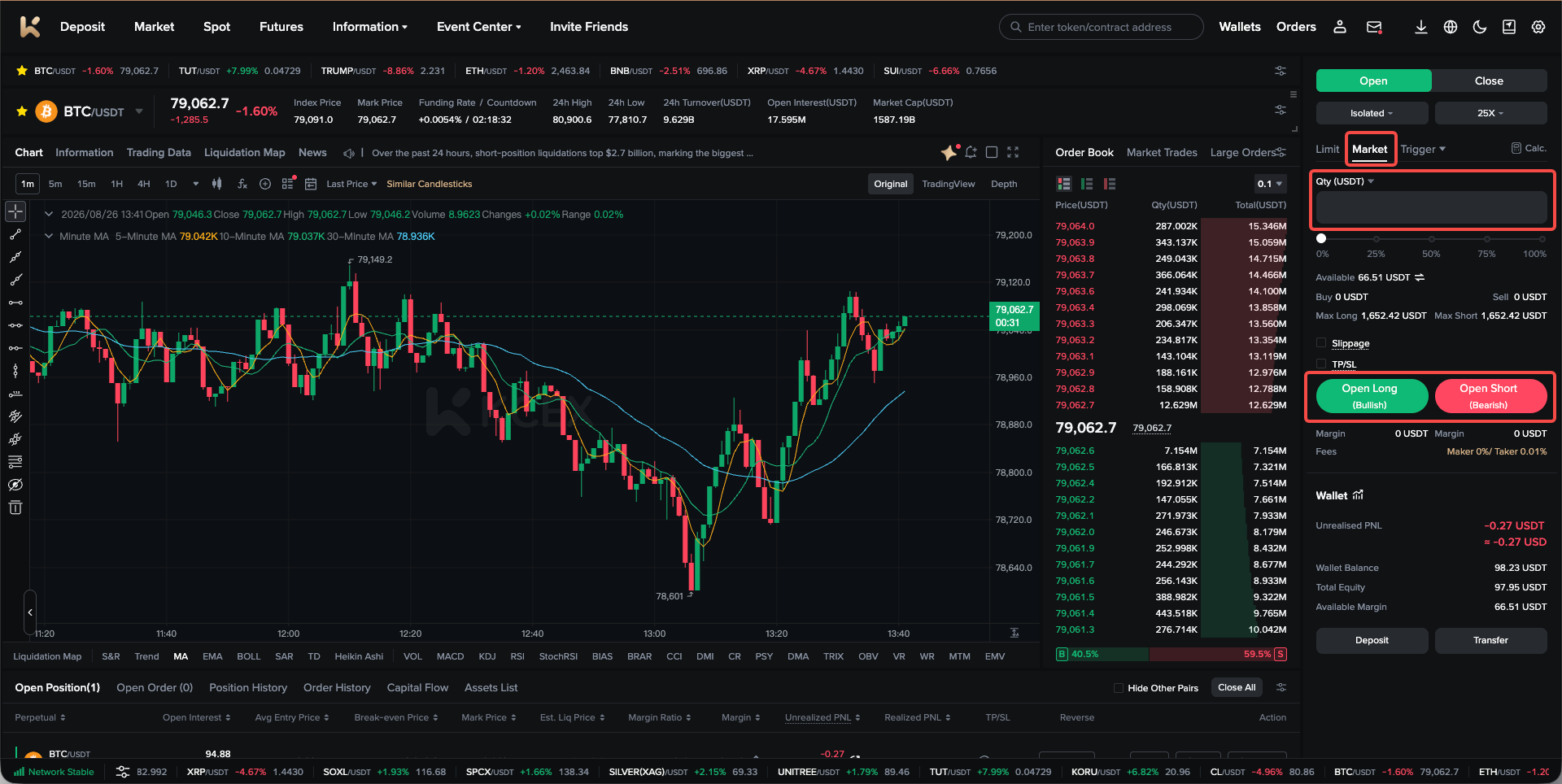
Go to the order placement section of the futures trading page, select Market Order, enter the quantity, and then click Open Long or Open Short to place the order.
3. Trigger Order
(1) Definition
Users can set a trigger price, order price, and quantity in advance. When the market price reaches the trigger price, the system will automatically place an order at the specified order price. Positions or margin will not be frozen before the trigger order is successfully triggered. KCEX currently supports trigger market orders and trigger limit orders.
(2) Advantages and Disadvantages
Advantages: Trigger orders allow users to set entry or exit prices in advance, reducing the need to monitor the market constantly.
Disadvantages: Successful triggering is not guaranteed. An order may fail to trigger because the price does not reach the trigger price, the available margin is insufficient when triggered, or for other reasons.
(3) Use Cases
Trigger orders are generally suitable for setting a predetermined entry or exit price.
The following are two common trigger order scenarios:
Scenario 1: Trader A wants to exit a position with a stop-loss. Trader A holds a BTC perpetual futures long position with an average entry price of 80,000 USDT and believes that approximately 79,000 USDT is a support level. If the price breaks below this support level, it may continue to fall. Trader A can set the Trigger Price at 79,000 USDT and the triggered Order Price to Market. If the price falls to 79,000 USDT, the stop-loss will be triggered and a market order will be placed to close the long position.
Scenario 2: Trader A wants to enter a long position. The current market price of BTC perpetual futures is 79,000 USDT. Trader A believes that a breakout above 80,000 USDT may lead to a significant upward movement. Trader A can place a trigger order to open a long position, setting the Trigger Price at 80,000 USDT and the triggered Order Price to Market. If the price rises to 80,000 USDT, the trigger order will be activated and a market order will be placed to open the long position.
(4) How to Set a Trigger Order
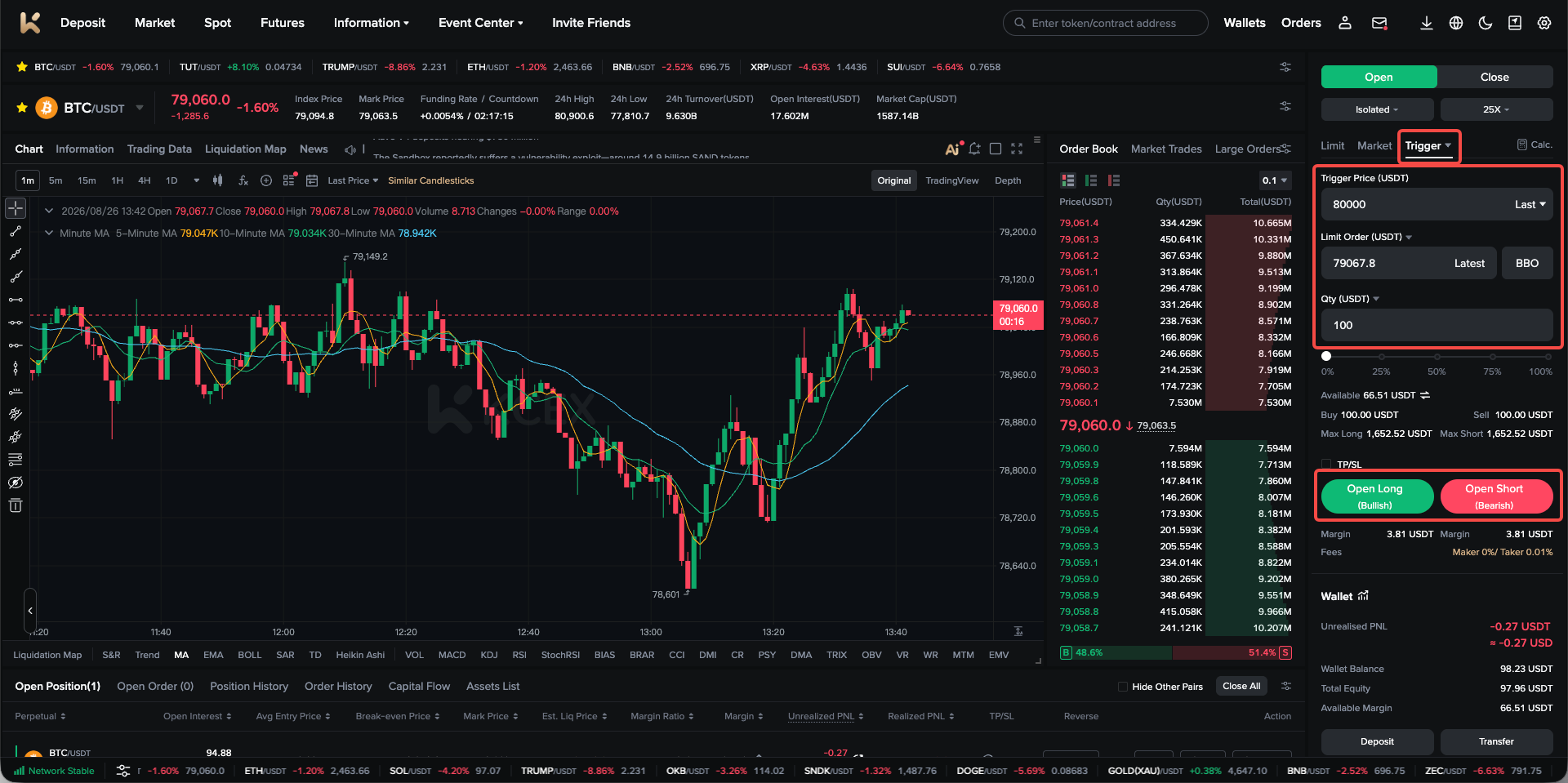
Go to the order placement section of the futures trading page, select Trigger Order, enter the trigger price, order price, and quantity, and then click Open Long or Open Short to place the order.
4. Trailing Order
(1) Definition
A trailing order is a strategy that automatically tracks market price movements. When the price reaches a historical high or low and then retraces, the trigger price is calculated based on your specified callback amount or rate, and the order is executed automatically.
The actual trigger price is calculated as follows:
Sell:
Actual Trigger Price = Historical Market High − Callback Amount (Price Distance)
or
Actual Trigger Price = Historical Market High × (1 − Callback Rate%)
Buy:
Actual Trigger Price = Historical Market Low + Callback Amount
or
Actual Trigger Price = Historical Market Low × (1 + Callback Rate%)
Users can also select an activation price for the order. The activation price is the condition used to activate the trailing order. When the selected price type reaches or exceeds the activation price, the order will be activated. The system will only begin calculating the actual trigger price after activation.
If no activation price is entered, the trailing order will be activated immediately after it is placed. The activation price type can be set to the latest price, fair price, or index price.
(2) Advantages and Disadvantages
Advantages: A trailing order can automatically track trend reversals, enabling dynamic take-profit or stop-loss strategies.
Disadvantages: The parameters are relatively complex. If they are set improperly, the order may fail to trigger or may trigger too frequently, resulting in losses.
(3) Use Cases
Trailing orders are generally suitable for buying during a rebound from a market bottom or selling during a pullback from a market high.
The following are two common trailing order scenarios:
Scenario 1: Trader A wants to buy during a rebound from the bottom. Assume that the current BTC perpetual futures market price has fallen to 79,000 USDT. Trader A believes that the price will continue to decline but may rebound after reaching 77,000 USDT. Trader A wants to buy a specified quantity after the rebound reaches 1%. Trader A therefore sets the activation price of the trailing order to 77,000 USDT, the callback rate to 1%, and the order direction to Buy to Open Long.
Scenario 2: Trader A wants to sell during a pullback from a market high. Assume that the current BTC perpetual futures market price has risen to 80,000 USDT. Trader A believes that the price will continue to rise but may pull back after reaching 82,000 USDT. Trader A wants to sell a specified quantity after the decline reaches 1%. Trader A therefore sets the activation price of the trailing order to 82,000 USDT, the callback rate to 1%, and the order direction to Sell to Open Short.
(4) How to Set a Trailing Order
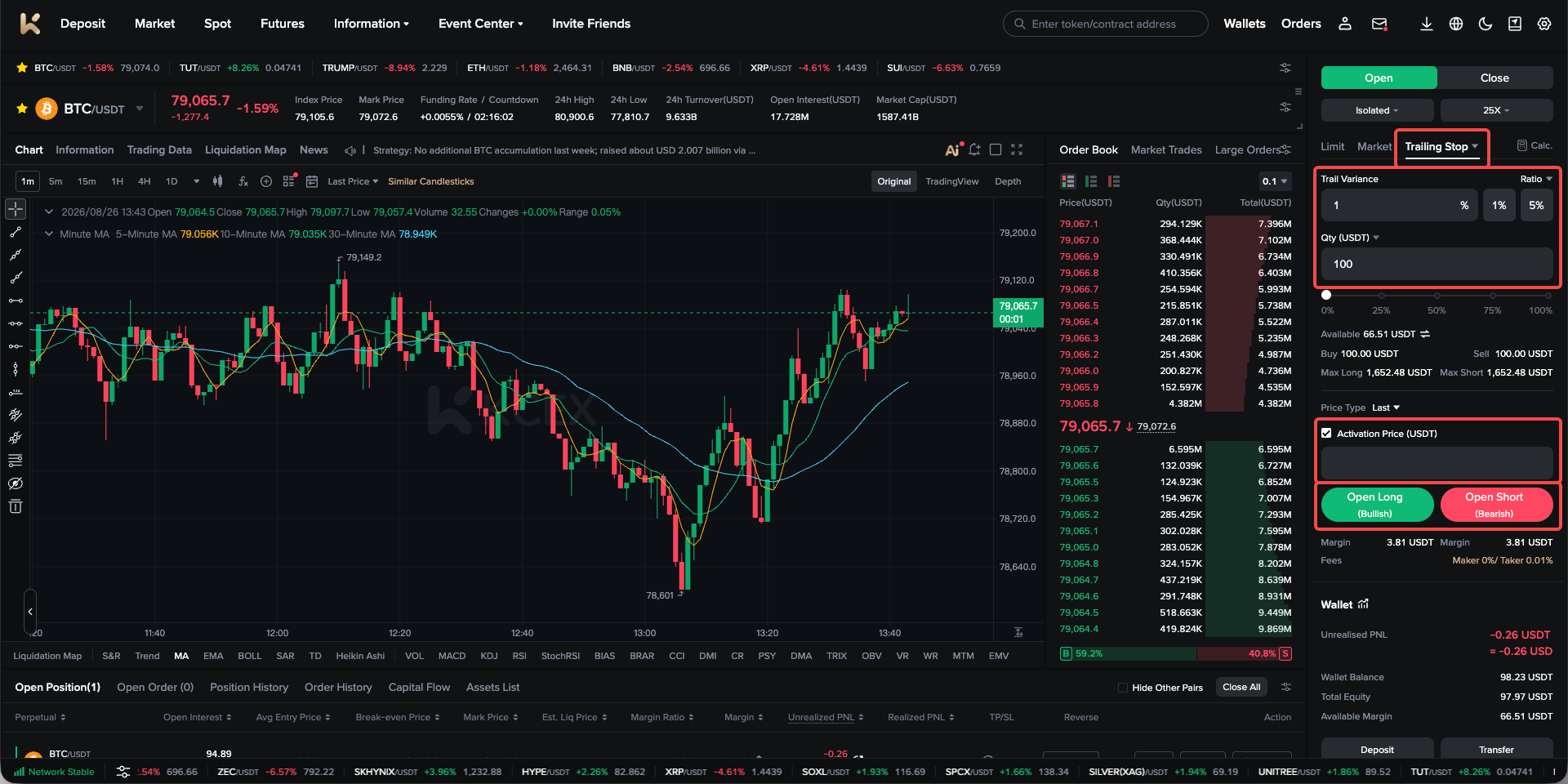
Go to the order placement section of the futures trading page, select Trailing Order, enter the callback amount, order quantity, and activation price, and then click Open Long or Open Short to place the order.
5. Advanced Limit Order
(1) Definition
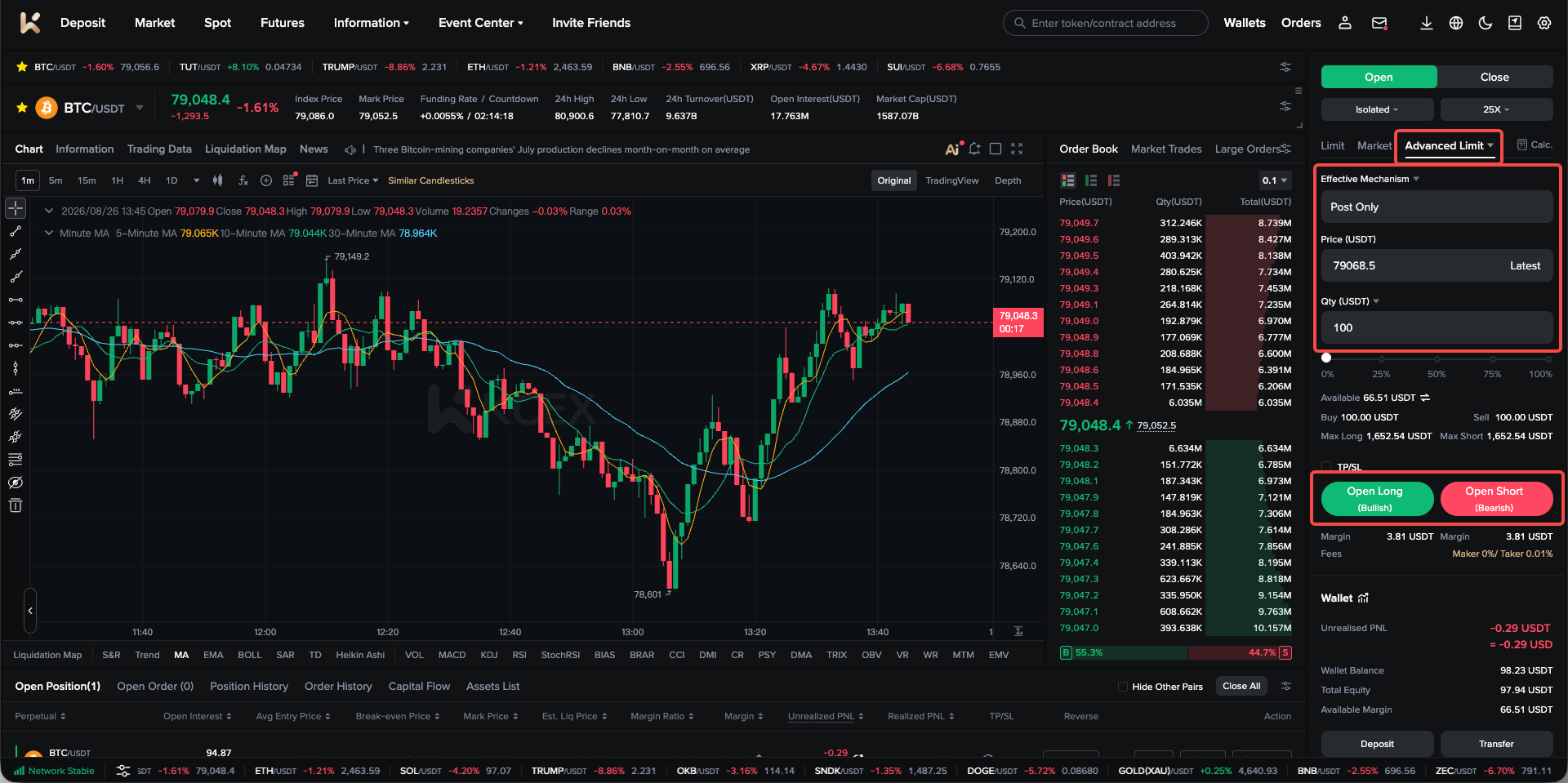
An advanced limit order is an order type based on a limit order. It includes four time-in-force mechanisms: Post Only, IOC (Immediate or Cancel), FOK (Fill or Kill), and GTC (Valid Until the Specified Date).
- Post Only: The order is placed in the market. If it would immediately match an existing order, it will be cancelled, ensuring that the order is executed as a Maker order.
- IOC (Immediate or Cancel): If an IOC order cannot be filled immediately at the specified price, any unfilled portion will be cancelled.
- FOK (Fill or Kill): If an FOK order cannot be filled in full, the entire order will be cancelled immediately.
- GTC (Valid Until the Specified Date): If a GTC order is not fully filled, it will be cancelled automatically on the specified date.
(2) Use Cases
Common Post Only scenario:
Trader A wants to open a BTC perpetual futures long position at 80,000 USDT and wants the order to be executed as a Maker order to reduce trading fees. Trader A can therefore place a Post Only buy order to open a long position at 80,000 USDT.
Common IOC scenario:
The BTC perpetual futures market is experiencing significant volatility. Trader A wants to open a BTC perpetual futures long position at 80,000 USDT or a better price and wants as much of the order as possible to be filled, with any unfilled portion cancelled. Trader A can therefore place an IOC buy order to open a long position at 80,000 USDT.
Common FOK scenario:
The BTC perpetual futures market is experiencing significant volatility. Trader A wants to open a BTC perpetual futures long position at 80,000 USDT or a better price. As Trader A does not want to manage a small partially filled order, they want the entire order to be filled or not filled at all. Trader A can therefore place an FOK buy order to open a long position at 80,000 USDT.
Common GTC scenario:
Assume that a Federal Reserve meeting will be held in two days. Trader A expects BTC perpetual futures to experience significant volatility during the meeting and wants to open a long position at 60,000 USDT or a better price. If the order remains unfilled after the meeting ends, Trader A wants it to be cancelled automatically. Trader A can therefore place a GTC buy order to open a long position at 60,000 USDT and set the expiry time to after the meeting ends.
(3) How to Set an Advanced Limit Order
Go to the order placement section of the futures trading page, select Advanced Limit, choose the appropriate time-in-force mechanism, enter the quantity and order price, and then click Open Long or Open Short to place the order.
6. Take-Profit and Stop-Loss
(1) Definition
TP/SL orders help users automatically close positions when the specified price is reached, allowing them to secure profits or control losses. You can set TP/SL conditions when opening a position or after the position has been opened. The system will automatically place a market order to close the position based on the market price.
- Set TP/SL when opening a position: When submitting an opening order, you can set TP/SL conditions at the same time. The system will activate them automatically after the opening order is filled.
- Set TP/SL for an open position: You can set TP/SL conditions at any time while holding a position to help respond to market movements.
(2) Advantages and Disadvantages
Advantages: Users can set closing prices for their positions in advance. When the specified price is reached, the system will automatically close the position to secure profits or limit the maximum loss.
Disadvantages: During significant market volatility, the execution price after the order is triggered may differ substantially from the expected price.
(3) Use Cases
TP/SL orders are generally suitable for closing a position to take profit or stop loss when a specified price is reached.
The following are two common TP/SL scenarios:
Scenario 1: Trader A wants to exit a position with a stop-loss. Trader A holds a BTC perpetual futures long position with an average entry price of 80,000 USDT and believes that approximately 79,000 USDT is a support level. If the price breaks below this support level, it may continue to fall. Trader A can set the Stop-Loss Trigger Price at 79,000 USDT. If the price falls to 79,000 USDT, the stop-loss will be triggered and a market order will be placed to close the long position.
Scenario 2: Trader A wants to exit a position with a take-profit. Trader A holds a BTC perpetual futures long position with an average entry price of 80,000 USDT and believes that approximately 82,000 USDT is a resistance level. If the price approaches this resistance level, it may reverse and decline. Trader A can set the Take-Profit Trigger Price at 82,000 USDT. If the price rises to 82,000 USDT, the take-profit will be triggered and a market order will be placed to close the long position.
(4) How to Set Take-Profit and Stop-Loss
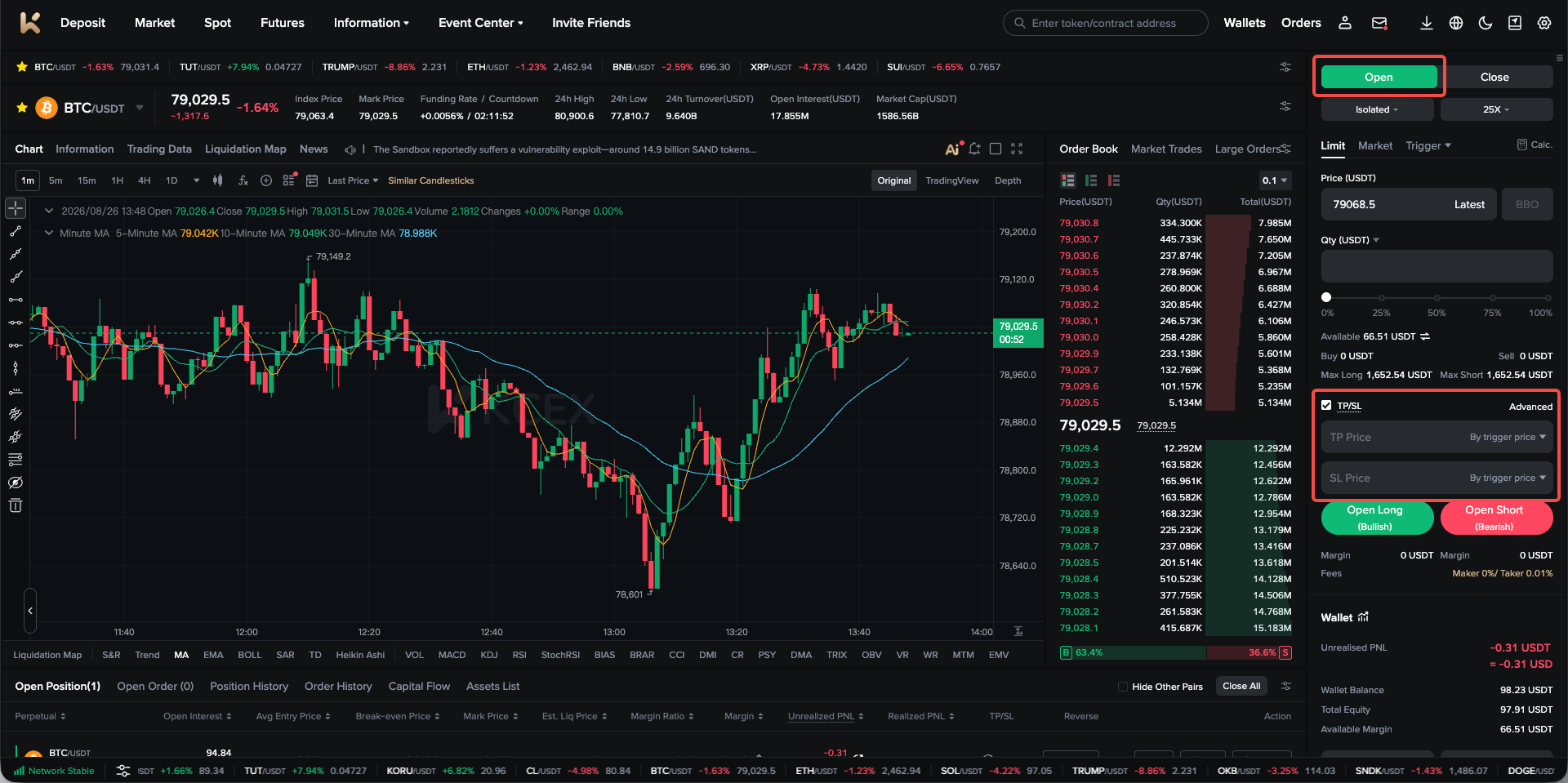
1. In the order placement section of the futures trading page, you can set TP/SL conditions for an opening order. After entering the opening order parameters, select TP/SL, enter the corresponding take-profit and stop-loss prices, and then click Open Long or Open Short to place the order.
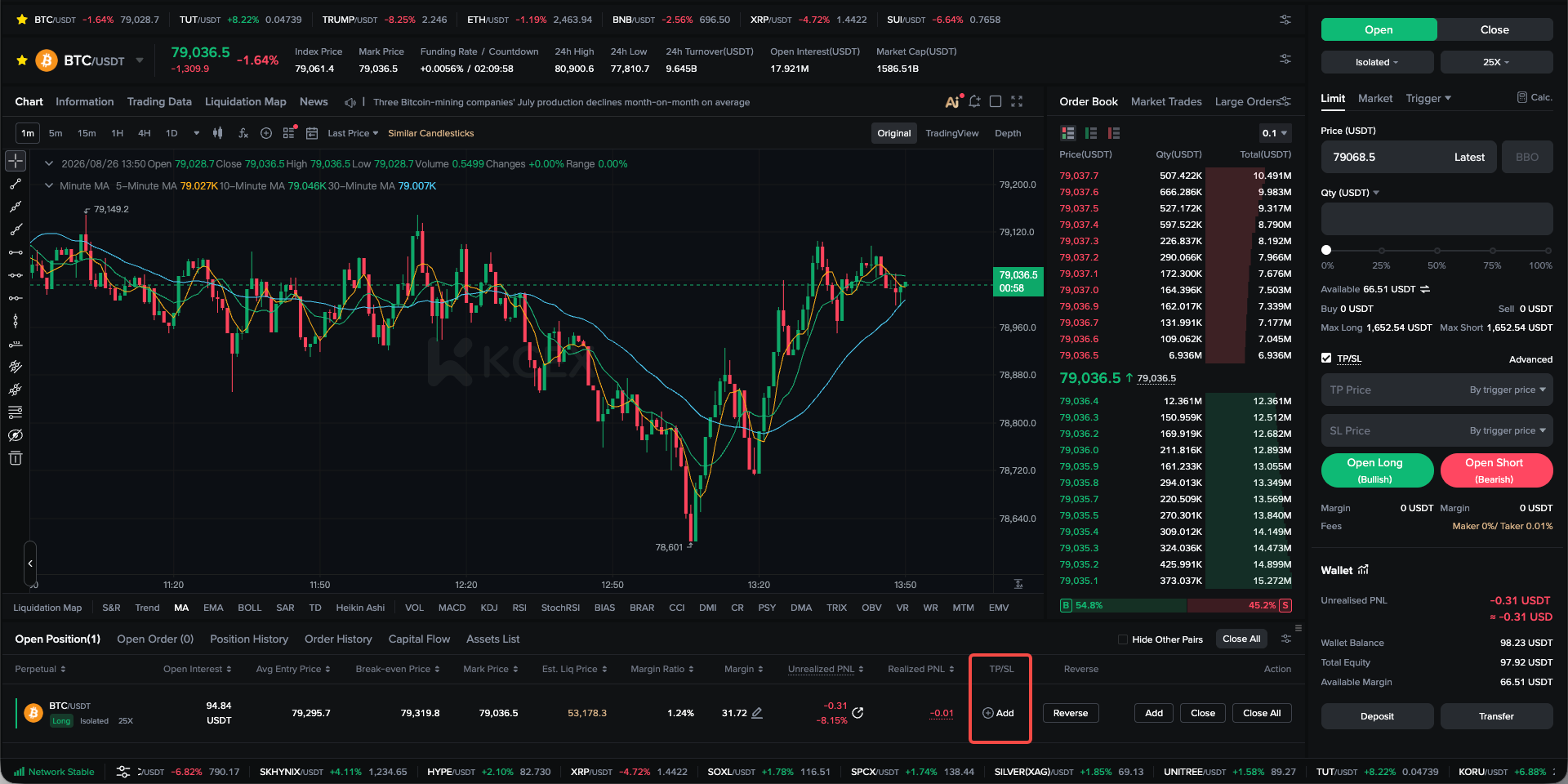
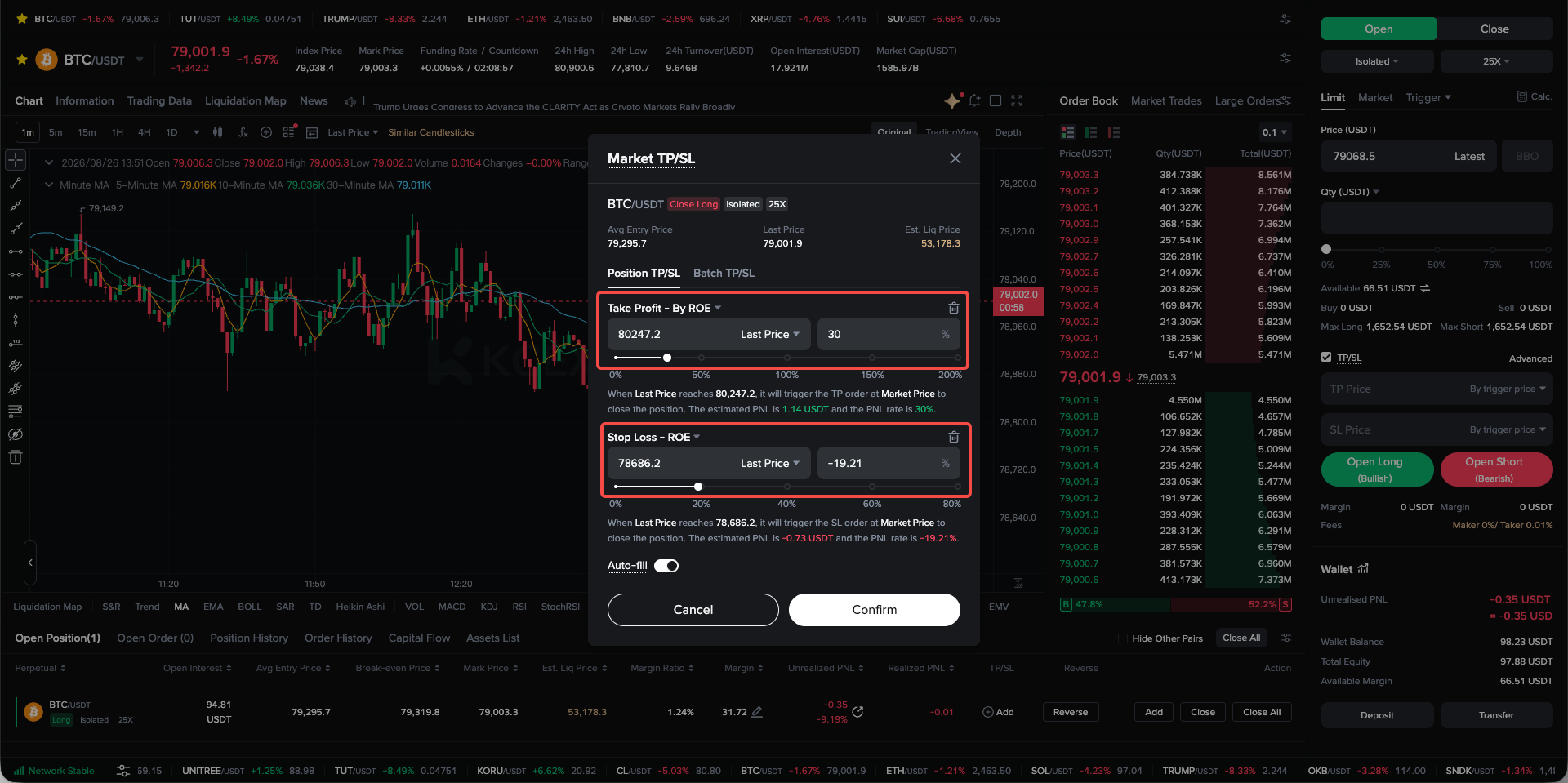
2. For a current position, locate the relevant position’s TP/SL section and click Add. Set the take-profit and stop-loss prices in the pop-up window, and then click Confirm to place the order.
Important Notes: When using trigger orders, trailing orders, TP/SL orders, or similar order features, factors such as market volatility, insufficient funds, and position limits may cause an order to fail to trigger. Whether the trigger succeeds or fails, you will receive a relevant email or app push notification. Please monitor your email and app notifications closely.
KCEX remains committed to providing users with secure and efficient futures trading services. Thank you for your support!