

KCEX Take-Profit and Stop-Loss Guide: Setup Methods, Trigger Rules, and FAQs
2026-08-26 00:25:07
Take-profit and stop-loss orders are commonly used risk management tools in futures trading. Users can set take-profit and stop-loss prices in advance. When the market price reaches the specified trigger conditions, the system will automatically close the position according to the applicable rules. This article explains KCEX’s take-profit and stop-loss features, setup methods, the differences between position TP/SL and partial TP/SL, and common issues such as stop-loss orders not being triggered, helping you better understand their usage rules and risk management functions.
1. Introduction to Take-Profit and Stop-Loss
Take-profit and stop-loss are commonly used core trading tools. They allow users to set take-profit and stop-loss prices for their positions, and automatically close the positions when the market price reaches the target level.
Take-Profit
If you have an expected profit target for a position, you can set a corresponding take-profit price. Once the price reaches the preset profit target, the system will automatically close the position to lock in profits and prevent profit reversals.
For example, you open a long position of 1 BTC at 60,000 USDT and set the take-profit price at 65,000 USDT for the entire position. When the market price rises to this level, the system will automatically close the position, allowing you to secure a profit of 5,000 USDT.
Stop-Loss
If you have a maximum acceptable loss for a position, you can set a corresponding stop-loss price. When the price falls to the preset stop-loss level, the system will automatically close the position to prevent further losses.
For example, you open a long position of 1 BTC at 60,000 USDT and set the stop-loss price at 56,000 USDT for the entire position. When the price falls to this level, the system will automatically close the position, limiting the loss to an acceptable range.
2. Benefits of Take-Profit and Stop-Loss
The cryptocurrency market is highly volatile and may experience sharp price increases or declines. Without predefined profit and loss targets, a profitable trade may eventually turn into a loss or even be liquidated. Using take-profit and stop-loss orders offers the following key benefits:
(1) Risk control: When the market moves against expectations, a timely stop-loss can help prevent substantial losses or liquidation.
(2) Locking in profits: Closing a position when the price reaches the target helps prevent profits from being lost due to greed.
(3) Reducing emotional trading: Automatic position closure reduces poor decisions caused by fear or greed.
(4) No need for constant market monitoring: Orders can be executed automatically after being set, making them suitable for traders who cannot monitor the market around the clock.
3. How to Set Take-Profit and Stop-Loss
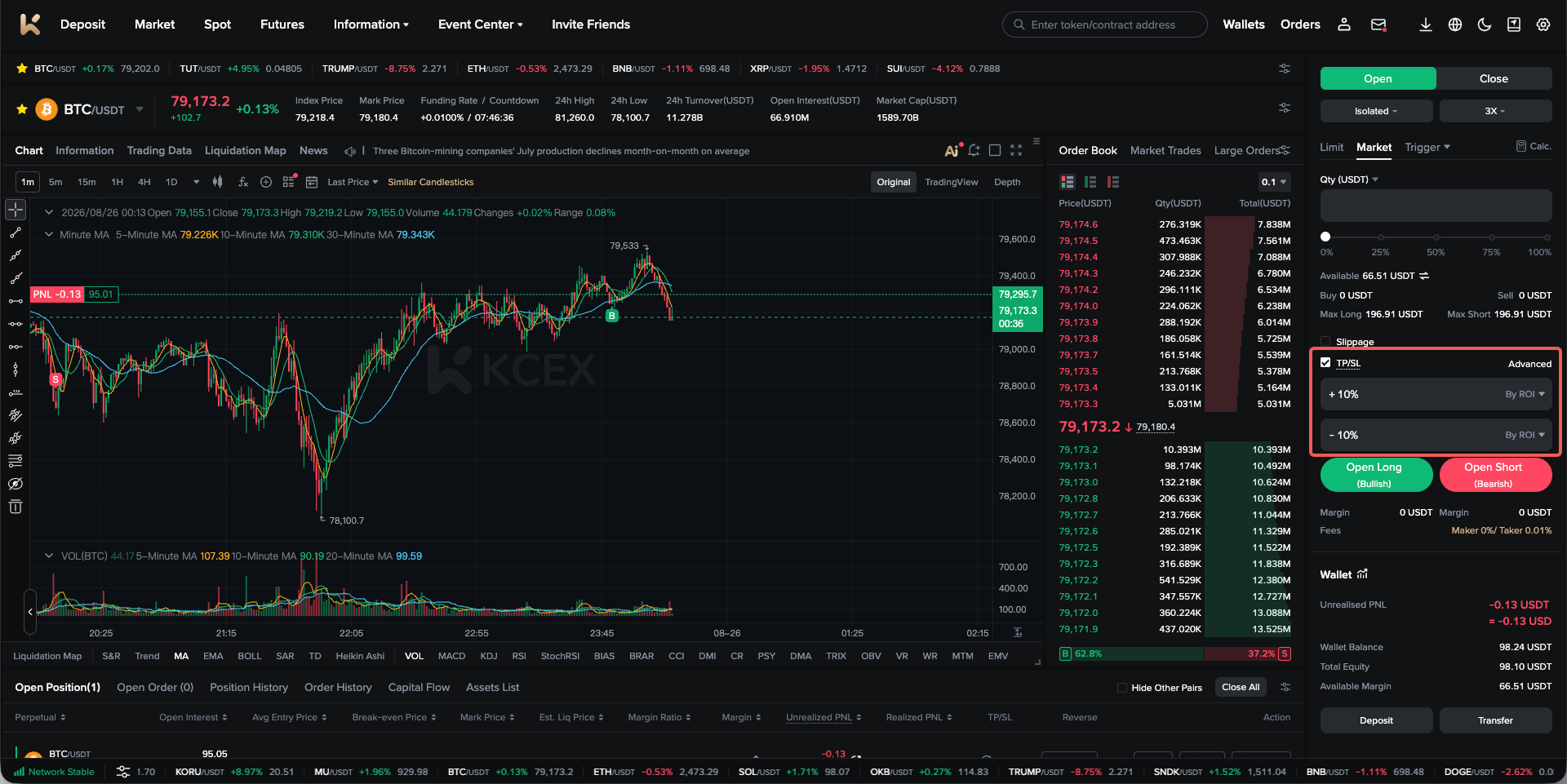
(1) Attach Take-Profit and Stop-Loss to an Opening Order
You can attach take-profit and stop-loss settings to an order before placing it. KCEX allows users to configure them based on either the trigger price or the return rate. Once the opening order is filled, the system will immediately place the corresponding take-profit and stop-loss orders.
On the futures trading page, take-profit and stop-loss settings are supported for limit, market, and trigger opening orders in the order placement panel.
(2) Set Take-Profit and Stop-Loss for a Specific Position
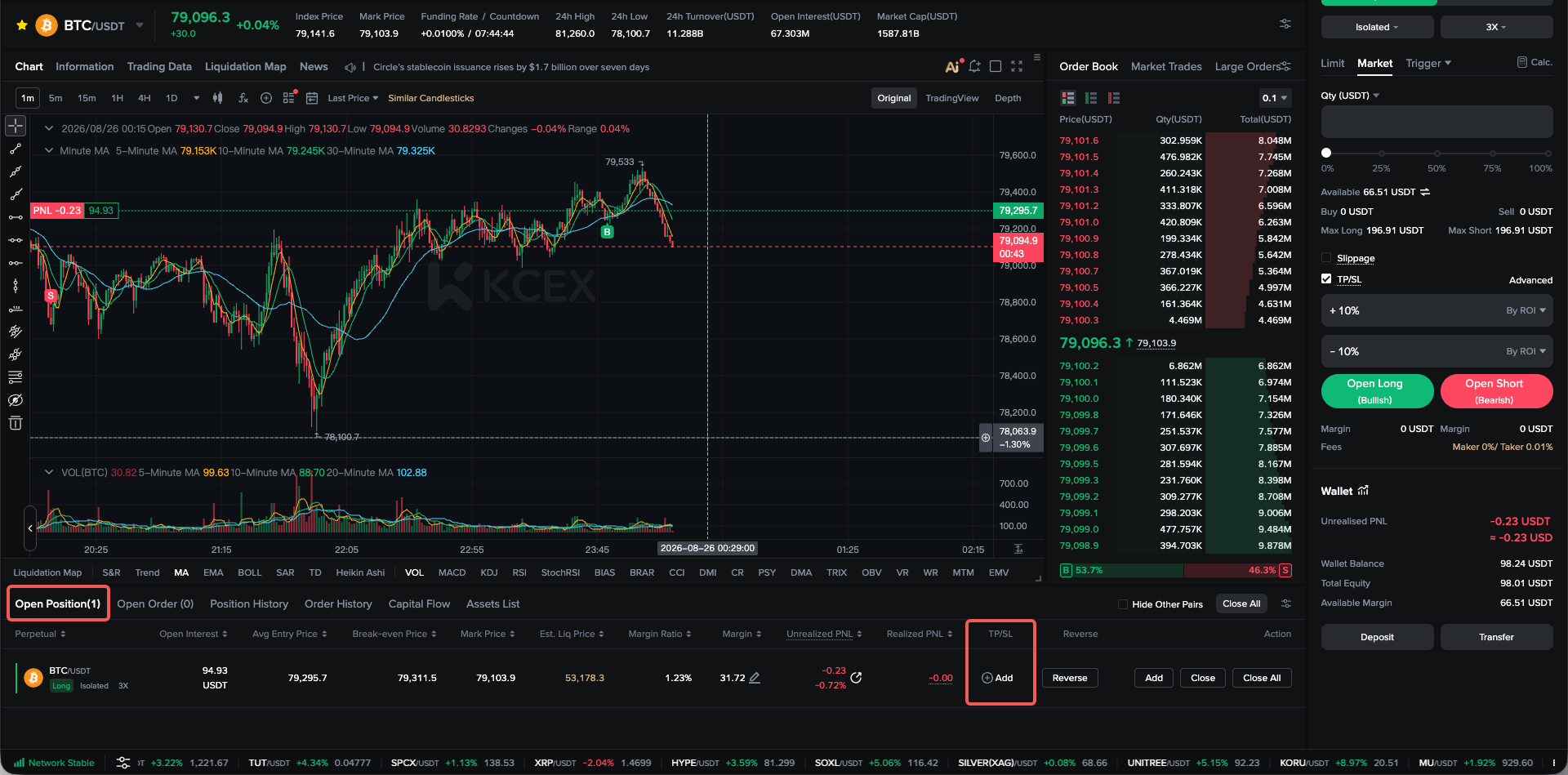
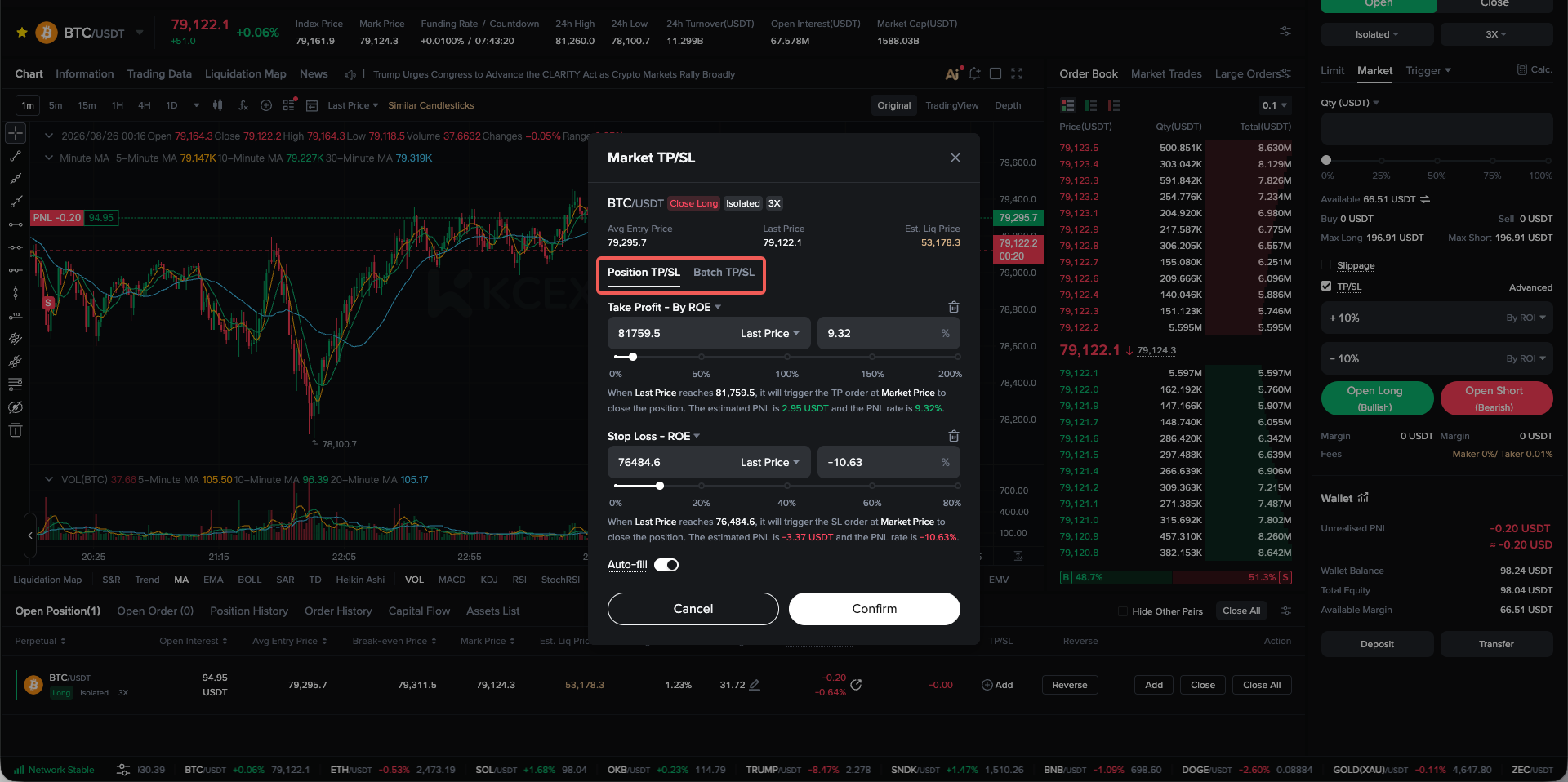
After opening a position, you can also add take-profit and stop-loss settings to a specific position. You may select either:
- Position TP/SL: Regardless of whether the position size is increased or reduced, the closing quantity will always be the entire position. Only one Position TP/SL order can be set for each position.
- Partial TP/SL: A specified portion of the position will be closed. Multiple Partial TP/SL orders can be set for each position.
On the futures trading page, go to the Current Positions section and select the relevant position to add take-profit and stop-loss settings.
(3) Edit or Cancel Take-Profit and Stop-Loss
Click the TP/SL setting displayed on the position to open a pop-up window, where you can directly edit or cancel it.
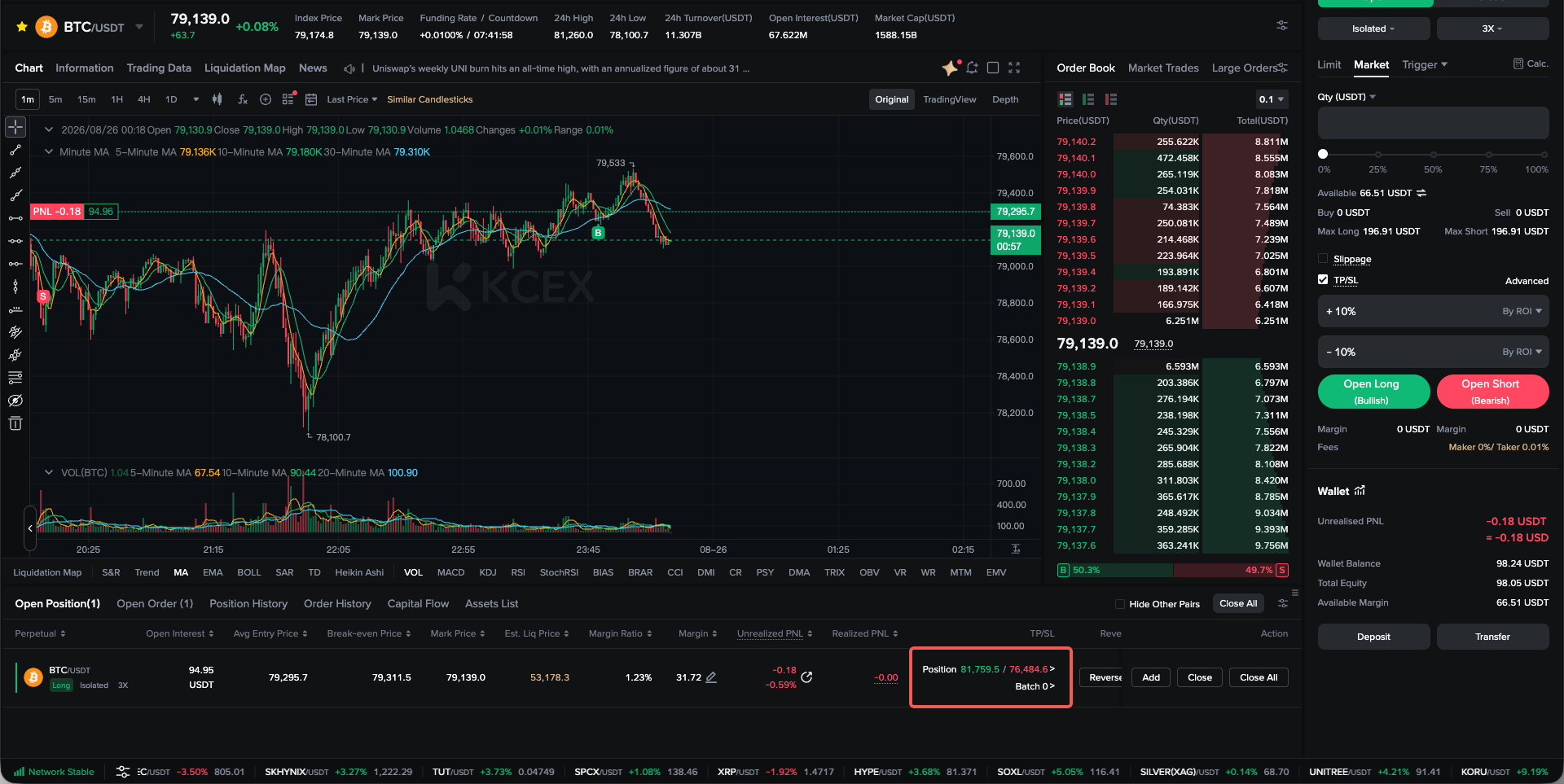
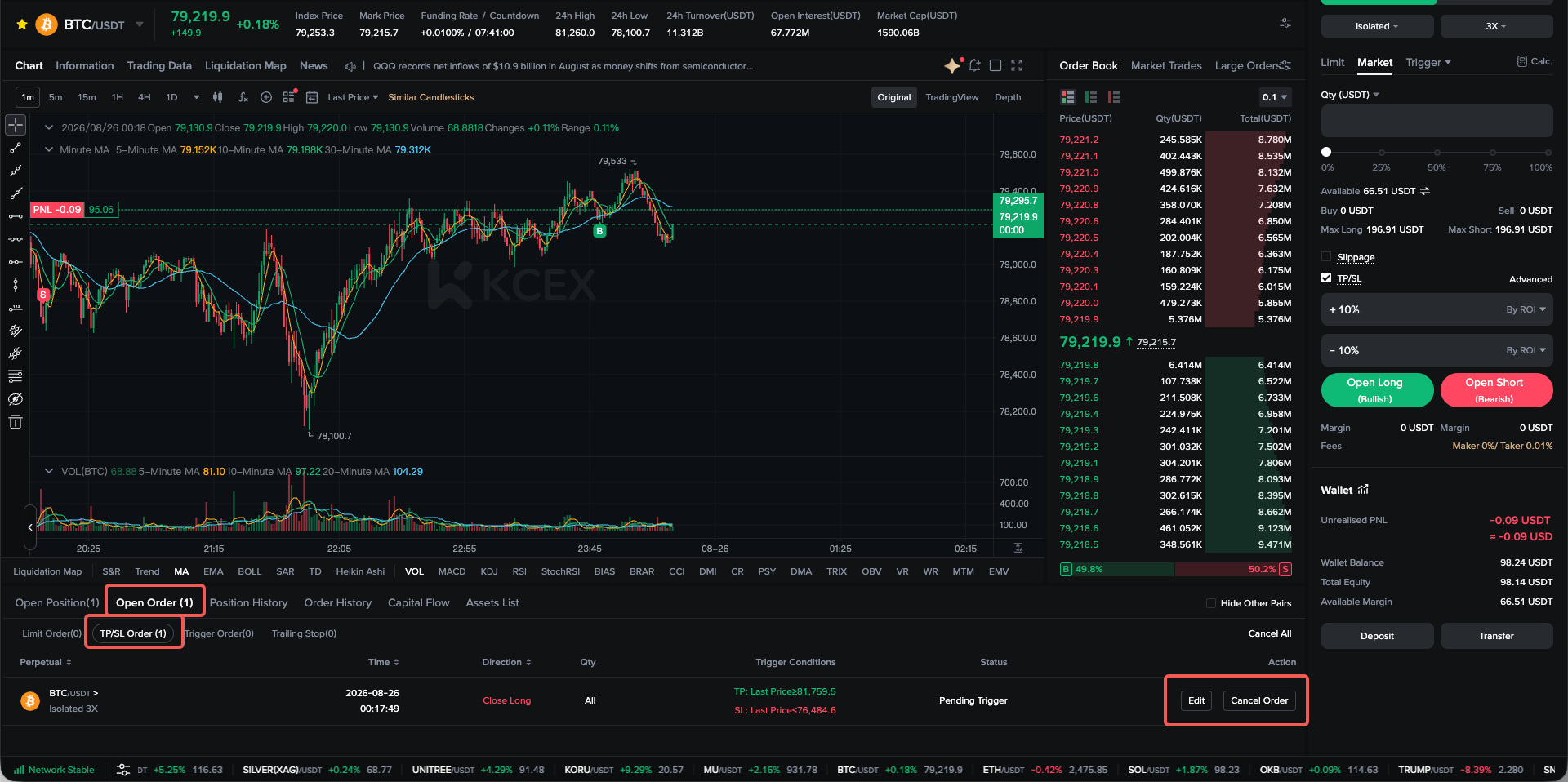
You can also switch to TP/SL Orders under Current Orders, locate the relevant order, and click Edit or Cancel in the Actions column.
4. Take-Profit and Stop-Loss FAQs
(1) What Is the Difference Between a TP/SL Order and a Regular Limit Order?
A regular limit order is submitted to the market immediately. It can be used to open or close a position, and the required margin will be frozen immediately.
A TP/SL order is a conditional order. A market order will only be placed when the market price reaches the trigger price, and TP/SL orders can only be used to close positions. TP/SL orders are suitable for setting an exit strategy in advance without constantly monitoring the market.
(2) Can I Set Multiple TP/SL Orders at the Same Time?
Yes.
There are two types of TP/SL orders: Position TP/SL and Partial TP/SL. Only one Position TP/SL order can be set for each position, while multiple Partial TP/SL orders can be set for the same position.
You can set multiple TP/SL price levels for the same position to implement a partial take-profit and stop-loss strategy. This allows you to lock in part of the profit when the price reaches an initial target while retaining part of the position to capture a potentially larger market movement.
(3) Can I Set a Limit Order to Be Placed After the TP/SL Trigger Price Is Reached?
No.
Currently, when the trigger price of a KCEX futures TP/SL order is reached, the system will directly place a market order to close the position on the user’s behalf.
(4) Why Was My Position Liquidated Even Though I Set a Stop-Loss?
This is most likely because the stop-loss price was less favourable than, or too close to, the position’s estimated liquidation price.
During periods of significant market volatility, if your stop-loss price is less favourable than or too close to the estimated liquidation price, the mark price may reach the estimated liquidation price first. As a result, liquidation may be triggered before the stop-loss order. Therefore, we recommend avoiding setting the stop-loss price too close to the liquidation price.
(5) Why Does My Actual P&L Differ From the Estimated P&L Displayed When I Set the TP/SL Order?
When a TP/SL order is set, the platform calculates the estimated P&L based on the trigger price. This estimate is for reference only.
When the order is actually triggered, the position is closed using a market order. Slippage, order book price fluctuations, and trading fees may therefore cause the actual P&L to differ from the estimate. The actual execution price after the TP/SL order is triggered may also differ from the specified trigger price.
(6) Why Was My TP/SL Order Not Filled?
TP/SL orders are not guaranteed to be successfully triggered and filled in all circumstances. An order may fail for the following reasons:
- Insufficient liquidity: The system may be unable to find a counterparty to execute the order at the specified price.
- Execution price less favourable than the liquidation price: During significant market volatility, the available counterparty price may be less favourable than the position’s liquidation price, preventing the position from being successfully closed.
- Futures trading suspended: The relevant futures pair may be under maintenance or suspended from trading when the triggered order is placed.
- Recommendation: Consider trading major cryptocurrencies with sufficient liquidity.
(7) Common TP/SL Mistakes Made by Beginners
- Setting the stop-loss too close to the entry price: Normal market fluctuations may trigger the order and cause the position to be closed prematurely.
- Setting the stop-loss close to the liquidation price: Liquidation may occur before the stop-loss is triggered, making the stop-loss ineffective.
- Setting the stop-loss too far away: This creates excessive risk exposure, and the loss from a single trade may exceed the user’s tolerance.
- Ignoring trading fees: Failing to consider trading costs may cause actual P&L to differ from expectations.
- Setting an unrealistic take-profit target: An excessively high take-profit target may prevent the order from being filled for an extended period.
- Failing to make timely adjustments: The TP/SL strategy is not updated promptly after market conditions change.
KCEX remains committed to providing users with secure and efficient futures trading services. Thank you for your support!